


Most catalog teams audit descriptions, images and categories. Almost nobody audits the 8, 12, 13 or 14 digits that tell marketplaces and shopping platforms which product a listing actually is.
Google is blunt about it: products with an assigned GTIN but submitted without one “may have limited visibility”, and incorrect GTINs can prevent products from being matched correctly or even cause them to be rejected.
GTIN errors are cheap to find and often cheap to fix, yet they sit underneath everything else you’ve invested in the listing. If the identifier points to the wrong product, the best description in the catalog can still be attached to the wrong identity — or fail to match at all.
What the GTIN does that descriptive attributes can’t
The GTIN (Global Trade Item Number, the number behind an EAN or UPC barcode) exists primarily to identify a trade item.
Titles describe products. Brands, categories and attributes describe products. Internal SKUs identify them inside your own systems. A GTIN gives the product a standardized identity that can travel between manufacturers, retailers, marketplaces and other systems.
That’s what makes it useful for matching.
If your store calls something “KitchenAid Artisan Blender 1.5L Black” and another retailer calls it “KitchenAid K400 Blender - Black”, titles alone leave some ambiguity. A correctly assigned GTIN gives systems a much stronger signal that the two offers refer to the same trade item.
Google’s GTIN guidance in Merchant Center makes the consequences clear. Correct product identifiers help Google match products to the right offers and information. If a manufacturer has assigned a GTIN and you don’t submit it, visibility may be limited. Submit an incorrect one and the product may not match correctly — or may be disapproved.
Product Ratings depend on accurate matching too. Google warns that missing or inaccurate GTINs can result in fewer reviews being correctly associated with products.
The same problem matters as AI shopping agents start comparing products and offers. To say “this is the same blender, cheaper here”, a system first has to establish that the two listings refer to the same product.
Titles vary by retailer.
A correctly assigned GTIN doesn’t.
We made a broader version of this argument when writing about Google’s Universal Commerce Protocol: as more product discovery happens through agents rather than storefront navigation, structured product data becomes increasingly important. The identifier is the piece that tells those systems what the product actually is.
The problem is that GTIN errors are almost invisible on the product page. A customer doesn’t notice a wrong check digit or a barcode copied from another variant. You may only discover the problem when a channel flags the identifier, rejects the product or limits its visibility.
And there is an important distinction here:
A valid GTIN is not necessarily the correct GTIN.
A number can have the right length, a valid check digit and no obvious formatting problems — and still belong to a completely different product.
That gives you two separate things to audit: whether the GTIN is structurally valid, and whether it actually identifies the product you think it does.
Five GTIN errors worth looking for
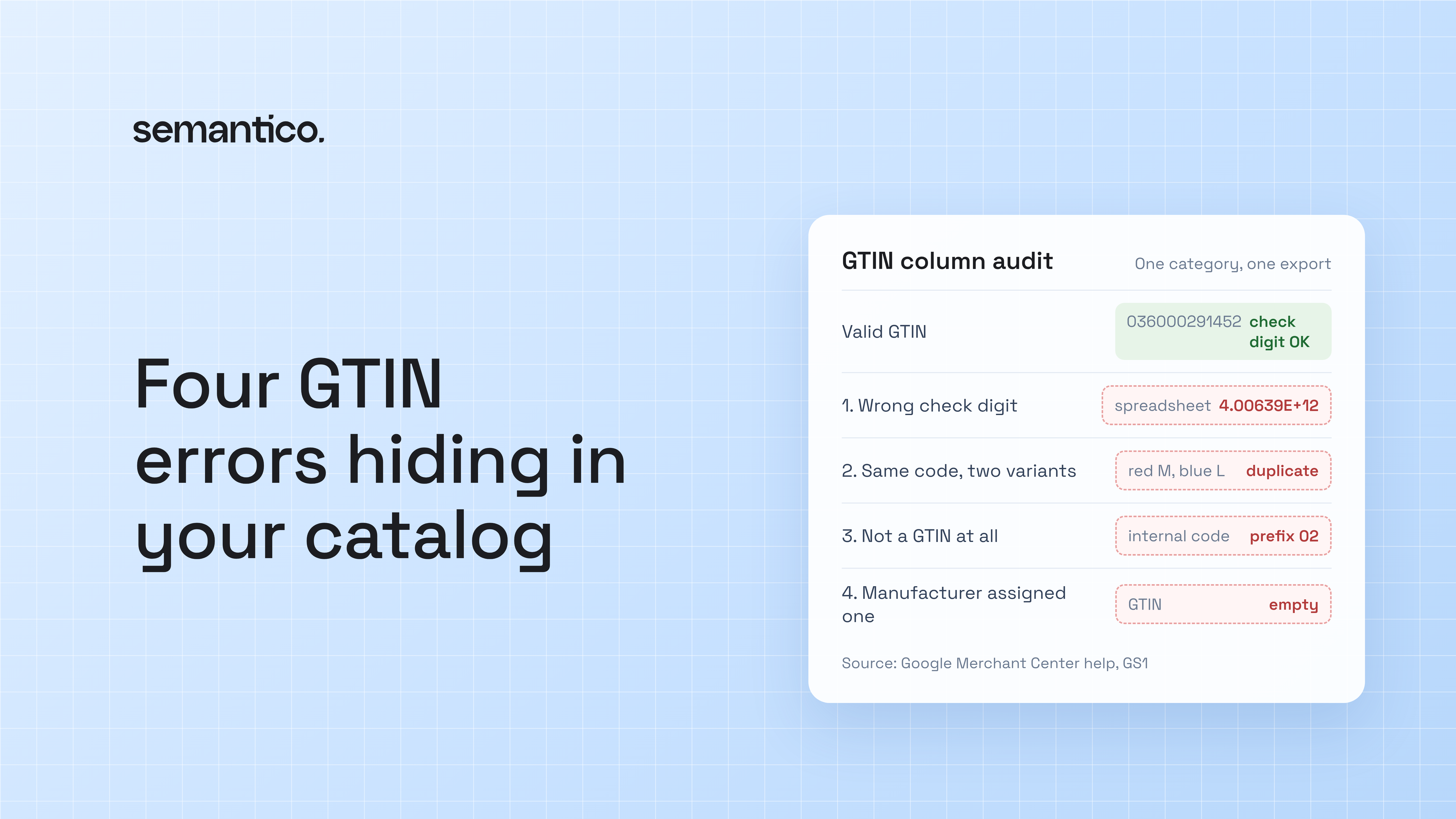
1. A wrong or missing check digit
The last digit of every GTIN is calculated from the others. That makes many transcription and formatting errors easy to detect automatically.
Google explicitly asks merchants to make sure the check digit is present and correct.
One common source of problems isn’t someone typing the barcode incorrectly. It’s spreadsheets.
Open a CSV of barcodes in a spreadsheet and the column may be interpreted as numbers. A 12-digit UPC beginning with 0 can lose its leading zero and become 11 digits. Long identifiers can also be displayed in scientific notation, such as 4.00639E+12, creating opportunities for corruption when data is exported again.
Identifiers should be stored as text, not numbers.
2. The same GTIN on several variants
GS1 is clear that each product variation needs its own GTIN. Different sizes, colours and combinations of those attributes generally represent distinct trade items and therefore need distinct identifiers.
Google gives the same guidance for product variants.
In real catalogs, the mistake is easy to make. Someone creates a variant by copying the parent or another variant, and the GTIN comes along with everything else.
Now your red size M and blue size L claim to be the same trade item.
Duplicate GTINs don’t automatically mean something is wrong — the same trade item can legitimately appear in multiple records, markets or systems — but two genuinely different variants sharing one GTIN deserve investigation.
3. Something that isn’t a GTIN in the GTIN field
Internal SKUs, supplier references and store-specific identifiers often end up in the GTIN field because it was the only numeric identifier column available.
Some even look convincing. They have the right number of digits and may occasionally pass a check-digit test by chance.
Google specifically warns merchants not to invent GTINs and not to submit identifiers from restricted or coupon ranges as normal manufacturer-assigned product identifiers.
Internal SKU, supplier reference and GTIN are different things. Give them different fields.
4. Empty where the manufacturer assigned one
Not every product has a GTIN.
But when a manufacturer has assigned one, Google recommends submitting it and warns that products with an assigned GTIN but submitted without it may have limited visibility.
Missing identifiers tend to accumulate in the long tail: older products, smaller suppliers, manually created SKUs and products imported from supplier spreadsheets that never contained the field.
Don’t invent a GTIN to fill the gap. Find the manufacturer-assigned identifier.
5. A valid GTIN that belongs to another product
This is the error a checksum won’t find.
Imagine your catalog contains:
Product: Blender Model A
GTIN: 1234567890123
The number has the correct length.
The check digit passes.
It isn’t duplicated anywhere else in your catalog.
It isn’t in a restricted range.
Every spreadsheet test says it’s fine.
But the GTIN actually belongs to Blender Model B.
You don’t have a formatting problem. You have an identity problem.
Google explicitly distinguishes this case: an identifier can be valid in structure but incorrect for the product being submitted.
This can happen when a supplier sends the wrong code, variants get mixed up, a product is replaced but its old identifier remains, or someone copies data from another listing.
Finding these errors requires more than validating digits. You have to compare the identifier and the product against manufacturer, GS1 or other authoritative product information.
How to find GTIN errors in a spreadsheet
You can catch a surprising number of problems without starting a project.
Export three columns for one category:
SKU | Parent / Variant Group | GTIN
Import the GTIN column as text, not numbers. Otherwise you risk creating the first problem while trying to audit it.
Then add a few checks.
Format
A GTIN should contain digits only and have a length of 8, 12, 13 or 14.
In Google Sheets or Excel:
=AND(ISNUMBER(--A2),OR(LEN(A2)=8,LEN(A2)=12,LEN(A2)=13,LEN(A2)=14))
Anything that fails deserves investigation.
Check digit
First normalize the value to 14 digits in B2:
=RIGHT("00000000000000"&A2,14)
Then validate the check digit:
=MOD(10-MOD(SUMPRODUCT(MID(B2,ROW($1:$13),1)*{3;1;3;1;3;1;3;1;3;1;3;1;3}),10),10)=--RIGHT(B2,1)
This applies the standard GTIN check-digit calculation after padding shorter GTIN formats with leading zeroes.
Test it with:
036000291452
It should return TRUE.
Duplicates
Use:
=AND(A2<>"",COUNTIF(A:A,A2)>1)
Every TRUE deserves investigation.
It may be a legitimate repeated offer for the same trade item, a duplicated catalog record or two different variants incorrectly sharing an identifier.
The formula tells you where to look. It doesn’t tell you which case you have.
Restricted ranges
Google also rejects GTINs that fall into certain restricted or coupon ranges.
This is useful as another validation signal, although for a production system I’d use current Google and GS1 validation rules rather than maintaining a permanent homemade list of prefixes in a spreadsheet.
Missing values
Finally, count blanks.
Then sort them by supplier, category or sales.
You’ll often see a pattern immediately: one supplier never sends GTINs, an old import pipeline dropped the field, or a particular part of the catalog was created before identifiers were properly managed.
At this point you have a useful baseline:
- invalid format
- bad check digit
- duplicates
- restricted identifiers
- missing GTINs
But don’t call everything that passes “correct”.
Those tests establish structural validity.
They don’t establish product identity.
For the products that matter most, the next question is whether each valid GTIN actually belongs to the SKU attached to it.
Fix it in the catalog, not in the feed
The tempting fix is to patch GTINs in whichever feed tool complains first.
That fixes one output and leaves the source catalog wrong for every other system that consumes it.
Instead, treat the manufacturer-assigned GTIN as reference data.
Store it once in the catalog. Keep internal SKUs and supplier references in their own fields. Give each variant its correct GTIN when the variant is created, rather than waiting for a marketplace to reject it.
Validate format and check digit at the point of entry so a stripped zero or corrupted identifier is caught during import instead of months later.
And for important products, go one step further: validate identity.
Does this GTIN actually correspond to this brand, product, size, colour and variant?
That’s a harder question than checking a digit.
It’s also the one that matters most.
Why this matters for product enrichment
A correct GTIN is one of the best starting points you can give an enrichment system.
Hand Semantico an EAN and it can use that identity to find authoritative sources for the product and generate the information your catalog is missing: titles, descriptions in your voice, categories in your taxonomy, structured attributes, images and translations, with your team reviewing the result before publishing.
Supplier references and internal SKUs remain separate metadata rather than being treated as global product identifiers.
But enrichment inherits the identity you give it.
If the barcode belongs to the wrong product, a system can do an excellent job researching the wrong thing.
That’s why identifier quality comes before enrichment quality.
And it’s why multi-brand retailers feel this problem particularly strongly: their catalogs inherit product data from dozens or hundreds of suppliers, each with different spreadsheets, naming conventions, identifiers and levels of data quality.
Run it on one category this week
You don’t need to audit the entire catalog.
Pick one category with lots of variants and enough products to expose import problems.
Run the checks and write down five numbers:
- invalid format
- bad check digit
- duplicates
- restricted identifiers
- empty GTINs
Then take a sample of the GTINs that passed every test and verify something the spreadsheet cannot tell you:
Does this GTIN actually belong to this product?
Finally, take the results to whoever owns supplier onboarding and ask one question:
At which step does a GTIN enter our catalog, and who checks it there?
That’s usually where the real problem starts.
If you want to check a single code quickly, Semantico’s free GTIN validator checks its structure and check digit for you.