

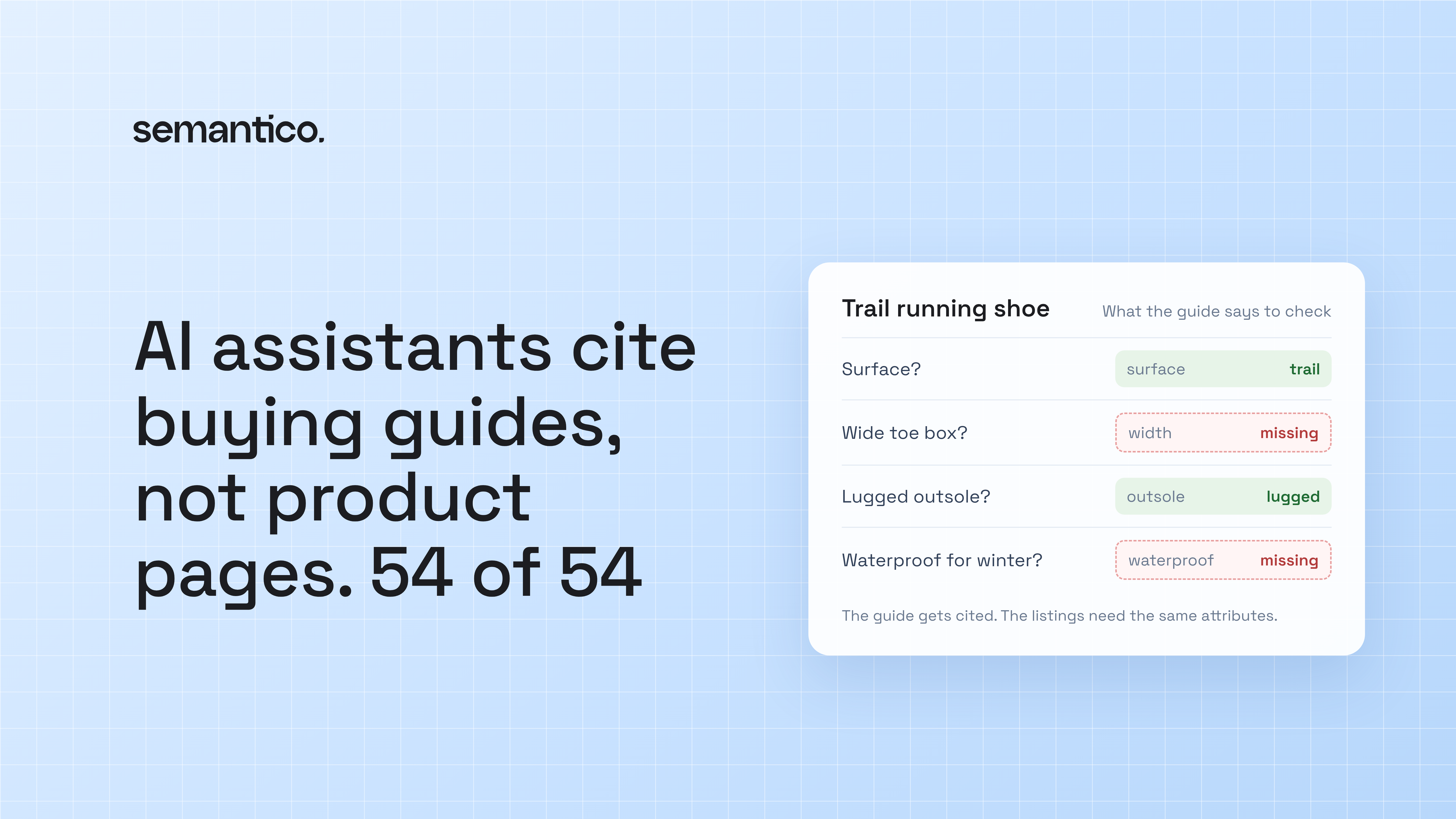
When we asked AI assistants buying questions in sports retail, 54 / 54 store citations on product questions went to buying guides, not product pages. Not most. All of them. The page an assistant quotes is the one that helps a shopper choose. But a buying guide only earns that citation if the products it points to carry the attributes it talks about, so the guide and the catalog have to be planned together.
What the 54 of 54 actually says
The study: buying questions asked to AI assistants with web search, October 2026, in sports retail. The method, as we publish it: API answers with web search from your market, several samples per question, and only changes beyond the noise. The consumer apps can differ, and we say so. The findings are on our AI visibility page.
It's one study in one category, so treat it as a strong signal, not a law of nature. But the signal is hard to ignore. On product questions, no store got cited for a product page. Every citation that pointed at a store pointed at a guide.
This is what GEO (being picked up by AI search and shopping assistants) looks like at page level. A search results page can rank a product page and let the shopper click through. An assistant has to write an answer, and it reaches for the page that already contains one.
Why assistants prefer buying guides
Look at the question a shopper actually types: "best running shoes for wide feet on trail", "what should I look for in a first pair of football boots". That's a comparison with a condition attached. A product page describes one product. It doesn't say why that product beats the other twelve for this shopper.
A good buying guide does. It names the criteria (surface, width, drop, cushioning, weight), explains the trade-off between them, and points to products that fit each case. That's the shape of an answer, so it's the page the assistant quotes.
Most product pages in a multi-brand catalog are written the other way round. They describe the product in the supplier's words, often with the deciding attributes missing or buried in prose. "Lightweight and responsive, perfect for your next run" answers no question an assistant is trying to answer.
A guide is only as good as the listings it points to
This is the part that's easy to miss. Writing more buying guides isn't enough on its own.
Say your guide on trail running shoes tells shoppers to look for a wide toe box, a lugged outsole and a waterproof membrane if they run in winter. Then it links to your trail category. If half the products there don't say whether they're waterproof, and width only appears for the brands whose suppliers send it, the guide makes a promise the catalog can't keep. The shopper who clicks through can't filter for what the guide just told them matters. Neither can an AI shopping agent trying to check which of your products fit.
The guide sets the criteria. The product data has to carry them, with the same names and the same values. "Waterproof", "water resistant", "GTX" and an empty field are four answers to one question, and only one of them is useful. You can't filter on adjectives.
There's a second reason to care. Product data also reaches search in structured form. Google's documentation says product markup lets price, availability, review ratings, shipping information "and more" show up right in results. That only works for the attributes your listings actually hold.
How to plan buying guides around shopper questions
Start from the questions, not from the categories.
Collect the questions your category sells on. Your site search logs and customer service tickets are the raw material. Pick one category and write down the ten questions that come up most.
Find the criteria each question turns on. "Trail shoes for wide feet" turns on surface and width. "Winter running jacket" turns on insulation, waterproofing and visibility. In most categories, a handful of attributes decide almost every question.
Write the guide around those criteria. One section per criterion, with the trade-off spelled out and products named for each case. That's the part assistants quote.
Check the listings against the guide. For every attribute the guide uses, count how many live products in the linked category carry it, with a value from one consistent list. This is where most guides fall apart, and it's a catalog job, not an editorial one.
We made the same argument about Google's Q&A field in Google's new Q&A field will show which attributes you're missing: the question a shopper asks tells you which attribute you need.
What filling the attributes looks like
The editorial work, writing the guide, is your team's. The attribute work underneath is mechanical, and it scales.
Define each attribute the guide relies on once, with its allowed values: surface is road, trail or track, and nothing else. Scope it to the categories where it applies, so running shoes get drop and width and rucksacks get capacity. Then generate the values across the whole category from each product's reference, with generation set to fill empty fields only, so listings your team already wrote are left alone. Every value is reviewed before it's published.
In Semantico that's custom sections (attributes you define, filled per category) and taxonomies (the controlled list each value is picked from). The result is a catalog where the guide's criteria and the product pages use the same words, which is what lets both the shopper and the assistant follow the guide through to a product.
A check you can run this week
Pick your best-selling category and ask ChatGPT, Claude and Gemini three questions a shopper would ask before buying, a few times each. Note which pages get cited. If they're competitors' guides, open the one cited most and list the criteria it uses. Then count how many of your own products in that category carry each of those criteria as a filled, consistent attribute.
That count is your gap. If you'd rather see it measured for your store, the audit shows five questions you win, five you lose, and the top cause behind them, whether that's a competitor's guide or missing product data. It arrives by email in a couple of hours, with no call and no access to your store.